
If you prefer to listen to your blogs, here’s the audio version.
Key takeaways
You don’t need to be a techie or have coding skills to have an AI-friendly website
How you structure a webpage helps AI understand your business and the problem you help solve
Having a clear, well-structured website is not just good for AI understanding, but humans and search engines too
I’m writing this post for those of you who are worried that your website is invisible to AI – you’ve been emailing me, mostly because you yourselves have been getting emails from someone telling you AI is ignoring your website.
So let me reassure you that there are some simple, straightforward steps you can take to give your website a better chance of being cited or recommended by AI. And the best thing is you don’t need technical or coding skills for tools like ChatGPT to potentially send you clients.
Why it’s important that AI understands your website
People are increasingly using tools like ChatGPT and Claude to gather information, get answers to their questions, and hear about products and services they’re interested in – including the services of coaches, therapists and consultants.
AI needs to understand the problem you help solve, the services you offer, who you are and your credentials and experience. If it doesn’t, you may miss out on opportunities to be mentioned in conversations it’s having with people looking for the services you provide.
What is schema and does my website need it?
Let’s talk about schema for a moment as you may have heard it mentioned in connection with AI visibility. Schema is a form of structured code. Your website doesn’t need it, but when it’s added to a webpage it can help AI systems and search engines understand the meaning and context of your content.
In fact, at the end of this blog I’ll share a story of how one of my clients had a well-designed website that included schema, but their website wasn’t cited by AI when I asked it for information about them.
So as far as schema goes, I would add it if that’s easy for you to do, but I wouldn’t worry if it’s not something you can do right now.
How AI understands your website
Different AI tools like Claude, Perplexity, DeepSeek etc, work in different ways. But in general this is how AI interacts with your website:
1. Finds your website
An AI tool may find and access your website through its own crawler (a bot that crawls websites), a search engine or another retrieval service.
2. Interprets the content
The AI tool then processes the information and decides whether it’s relevant to the questions it’s being asked.
3. May use your information in an answer
If AI decides your content is relevant, it may:
Use it to put an answer together
It may cite your website
Recommend that someone explores your services
AI needs to understand who you are and what problem you solve
This, in my opinion, is the most important thing you can do to help AI send you clients. But it may also be one of the hardest.
Your website needs to be clear about who you help, and what you do.
The reason it can be so hard to be clear about who you help and what you do, is because most business owners are very much ‘inside’ their own work. This can make it difficult to know whether you’ve clearly explained your services and who they’re for.
To make it easier, it can be helpful to break it down and think about:
The group of people you help and support
The problem or challenge you help them overcome or solve
The services you offer – what’s involved, price, session length, package etc
Who you are – your experience, credentials and qualifications
Your homepage and service pages are important pages to get clear as they will be some of the most visited pages on your website. Let’s look at what they need to say.
The job of your homepage
Your homepage should give a broad overview of your business and make it quickly obvious the problem you help to solve.
The homepage ‘header’ is the top of the page – this is what someone sees without scrolling. Making it quickly clear who you help and what you do is important for both human and AI understanding.
Let’s compare a couple of homepage headings.
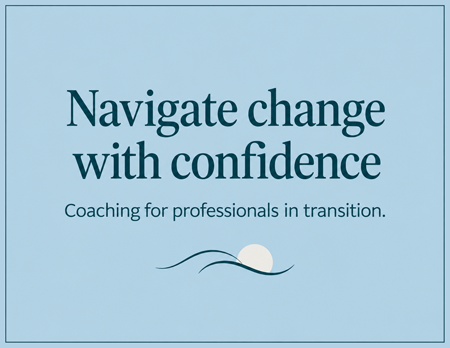
The image above isn’t a terrible heading, but let’s imagine someone facing redundancy is looking for support – this heading doesn’t make it immediately clear they’re in the right place to get that help. Instead, the visitor has to scroll down the page looking for clarity, or they may decide to hit the back button and go elsewhere.
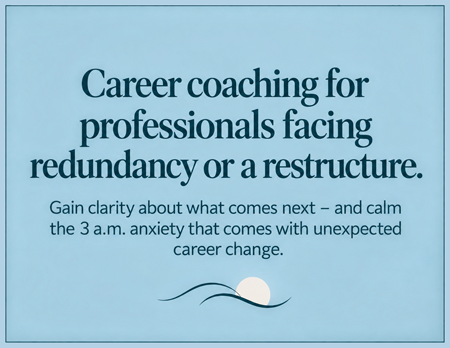
If that same person lands on this homepage, they’ll immediately know this is someone who can potentially help them because the headline is specific about who the coach helps.
If AI is having a conversation with someone who’s facing redundancy and looking for support, they’re potentially more likely to cite or recommend a coach based on the second version of the homepage header. This is because it’s much clearer about exactly the kind of situation they help with.
The job of your service pages
A visitor to your site may not arrive on your homepage – an AI tool may send them to a service page instead. So each of your service pages needs to make sense in its own right.
That means not only including all relevant information about your offer including the price, deliverables and how you’d work together, but also why you’re qualified to do this work.
For example, if you’re an accountant who does accounts for freelancers, your page should include a brief section about how long you’ve been doing this type of work, your qualifications, a testimonial from a client and a link to your about page for more information.
Different pages for different services
If you have more that one service or work with different groups of people who have different needs, consider having separate service pages. This gives you the space to explain the different processes, outcomes and pricing and can also help AI understand the distinctions between your offers.
The importance of a clear page structure
Properly structured webpages with clear headings, subheadings and relevant paragraphs of information help AI tools and humans more easily understand the information you share and its context.
It’s also important for accessibility and people who use screen readers.
Here’s the page structure I recommend which is a website accessibility and user experience design standard.
One clear main heading per page – called an H1
The H1 sits at the top of the page and is usually the largest heading. It communicates what the page is about and the information someone can expect to find.
Main sections – called H2s
H2s break the page into clear, meaningful topic sections and indicate what each section is about.
Subsections – H3s
H3s are used when an H2 section needs to be further divided.
Answer the questions your clients are asking in the language they use
People tend to be more conversational with AI tools than they are with Google’s search bar.
Someone may type into Google search: HR consultant Reading.
But in ChatGPT they may type: I want to hire someone to help me in the office but I’m struggling to understand employment rules. Is there someone local to me that can help me understand what I need to do?
Think about the questions your clients/potential clients ask, and make sure to provide the answers on your website. Look at:
What people say when they make an enquiry
What people say when you chat to them on discovery calls
What your ideal client type talks about in forums
The keywords people are typing into Google to find your services
Don’t just answer their questions, but use the same language they use.
For example, if you’re a career coach and notice your clients talk about ‘losing their job’, you don’t want to say ‘facing termination’ on your website.
Make your experience and expertise clear
Include trust signals on your website, like:
A high-quality image of you
Details of your qualifications and experience
Testimonials and case studies
Any professional memberships you belong to
Any publications you’ve written for or podcasts or interviews you’ve done
Links to credible external profiles or directories
Including this information helps visitors understand why they can trust you, and helps AI tools build a clearer picture of who you are and your professional expertise.
How to see what AI understands about you
Here are a few simple ways to find out what AI knows and understands about you.
Try different tools like ChatGPT, Google AI Mode and Claude etc to see how the results differ. Note that doing this on two different days can give you two different results.
Ask the tool these questions and ask them to tell you where they got the information from:
Who is [your name], and what services do they offer?
Can you recommend a coach/consultant/business who helps with [specific problem] in [location]?
What do you know about [your business name]?
Look at the results and see what sources are cited. Is it your website or another platform like a directory? Is the information consistent and correct or is it showing outdated or wrong information? If it is, make sure to update your website or the platform where the information’s being pulled from with the right details.
AI doesn’t need schema code to send you clients
At the beginning of this post I said I’d share a story of how a well-designed website that included schema still didn’t show up in AI when I specifically searched for it.
I started by checking the website for AI visibility using Framer’s ‘Can AI find your website?’ tool. The score came back 93 out of 100, which told me it was technically well prepared for AI visibility.
However, when I asked Google AI what it knew about the practitioner and their business, it didn’t link to the practitioner’s website at all. Instead, it linked to four different directories they were listed in.
Now those four directories are useful sources of information about the practitioner. But the fact that Google referenced them rather than the website suggests that technical optimisation alone might not be enough for AI to start mentioning you and sending potential clients your way.
The result reinforced my belief that it’s important, perhaps more so, that your website clearly explains who you help and the problems you help solve – which was what I was working on with this client.
And there’s also research suggesting that adding schema doesn't necessarily improve your AI visibility.
A schema markup analysis by Search Atlas also found no consistent relationship between the amount of schema markup on a website and its visibility across ChatGPT, Gemini and Perplexity.
So do add schema if that’s easy for you to do. But even more importantly, be clear about what your business does, and who it does it for, and share that information on a clearly structured webpage.
And if you’d like a first-time visitor perspective on your website or need help from a website copywriter, take a look at my services and don’t hesitate to get in touch.
